
Web Accessibility Services: WCAG 2.2 Audits and EAA Compliance
Design for Everyone. Comply with Confidence.
Accessibility is built into every stage of our experience design services, from UX design and UI design to development, user testing and ongoing website management.
When Do You Need Accessibility Support?
Since 28 June 2025, the European Accessibility Act has required many private sector businesses to make their digital products and services accessible. Public sector bodies have had similar duties since 2020.
- Your business is in scope of the European Accessibility Act and you have not had an audit. An audit shows where you stand and what to fix first.
- You are a public sector body and your accessibility statement is out of date. Statements must reflect a real, recent assessment.
- You are planning a redesign or platform migration. Building accessibility in from the start costs far less than fixing it after launch.
- A tender or procurement process asks for WCAG conformance. You will need evidence such as an audit report or Accessibility Conformance Report.
- Your site has been audited before, but new content keeps creating issues. Training and governance stop problems coming back.
- You rely on an accessibility overlay or plugin. Overlays do not fix the underlying code and content, so they are not a substitute for an audit and remediation.
Client spotlight - ESB Networks
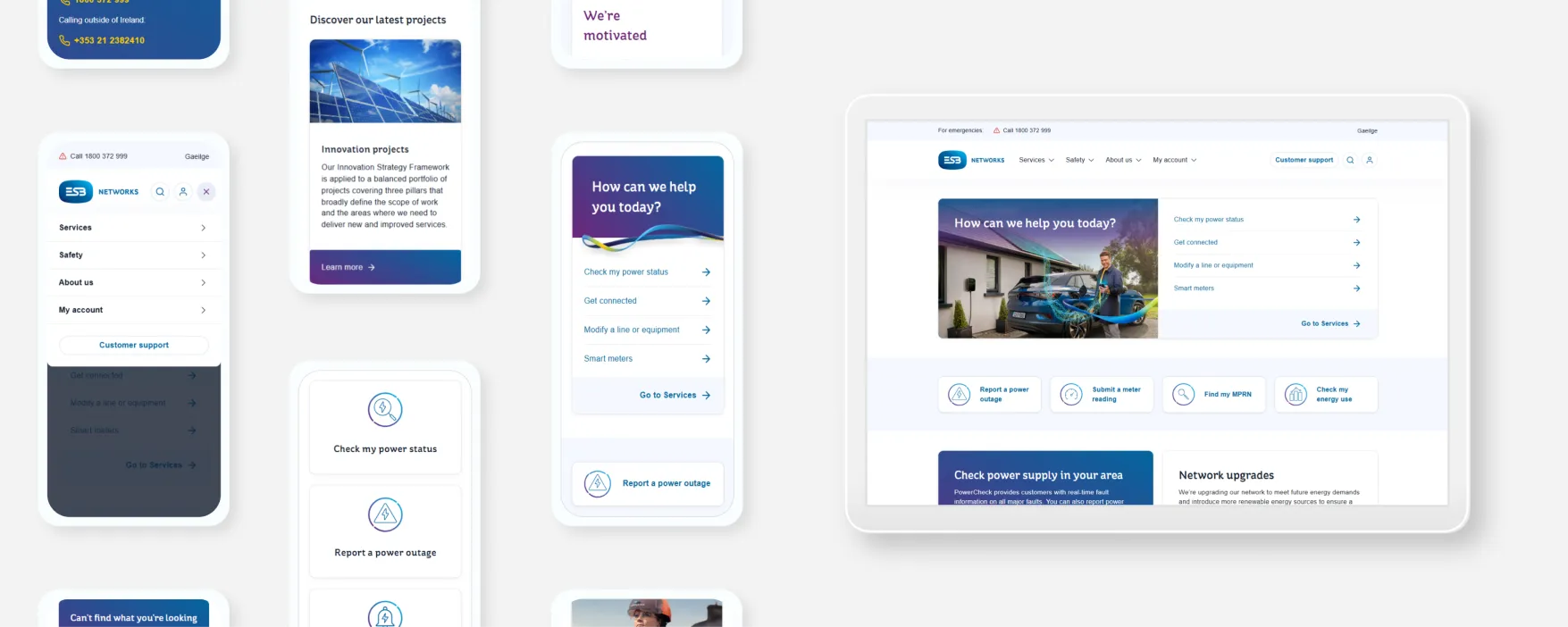
Project - Accessible Digital Experience Design & Development for ESB Networks
Challenge - ESB Networks required a website that would deliver an accessible experience to all users, including those with disabilities, while meeting stringent public-sector compliance requirements. The solution needed to be both inclusive and aligned with their brand.
Our Solution - We embedded accessibility from the outset, designing and developing the site to WCAG 2.2 AA standards. Every element, from colour contrast and keyboard navigation to screen reader compatibility and semantic code, was rigorously tested and validated. We also provided training to ESB Networks' content team to ensure ongoing compliance.
Outcome - The website delivers an accessible, inclusive experience for all users, demonstrating ESB Networks' commitment to serving every customer. The project continues to set a benchmark for public sector digital accessibility in Ireland.
Accessibility in Action
A selection of projects where accessibility was built in from the start, across healthcare, utilities and the public sector.


Can we audit the accessibility level of your digital products?
Our web accessibility services include:
- Accessibility Audits and Reviews - Comprehensive evaluation of your websites, applications, and digital products against WCAG 2.2 AA, EAA, and ADA standards, combining automated scans, expert manual review and assistive technology testing.
- Remediation - We fix the issues in design, code and content, or support your in-house developers with clear, ticket-ready guidance.
- Accessible Design and UX - Embedding accessibility from the first sketch, ensuring colour contrast, focus states, typography, and interaction patterns are inclusive by design.
- Accessible Development - Building semantic HTML, ARIA labels, keyboard navigation, and screen reader compatibility into every feature.
- Accessibility Statements and Conformance Reports - Statements for public sector websites and Accessibility Conformance Reports (ACRs) for procurement.
- Legacy Content Remediation - Making PDFs, forms, legacy content and third-party integrations accessible.
- Accessibility Training - Empowering your content, governance, and UX teams with the knowledge to maintain accessibility long after launch.
- Monitoring and Governance - Ongoing scans, regular spot checks and governance frameworks, available through ArekiboCare.
Steps of our accessibility service
Get clear advice and a fixed quote for your accessibility audit.
Accessibility Compliance FAQs
Answers to common questions about audits, costs, timelines and what the law requires.
The EAA applies to businesses providing in-scope products and services to consumers in the EU, such as e-commerce, consumer banking, telecoms, passenger transport, e-books and audiovisual media. Microenterprises with fewer than 10 staff and turnover of €2 million or less are exempt from the service obligations. Public sector bodies are covered by separate web accessibility rules.
If you serve US customers, the ADA may also apply, and courts use WCAG as the benchmark. We can confirm what applies to you during a scoping call.
An audit of a typical website takes two to four weeks. Remediation time depends on the number and severity of issues and on who makes the fixes. Most organisations fix critical issues first, then work through the rest over one to three months.
Accessibility - Deliverables & Glossary
| Deliverable | Description | Best Used For |
| Accessibility Audit | Comprehensive evaluation against WCAG 2.2 AA, EAA, and ADA standards with detailed findings and severity ratings. | Understanding the current compliance status and identifying remediation priorities. |
| Remediation Plan | Prioritised roadmap of fixes and improvements, sized and scoped for development teams. | Planning development sprints, budgeting for accessibility work. |
| Accessible Design Specifications | Design annotations covering colour contrast, focus states, typography, and interaction patterns. | Ensuring design handoff includes accessibility requirements. |
| Development Implementation | Semantic HTML, ARIA labels, keyboard navigation, and screen reader compatibility are built into every feature. | Launching accessible websites and applications. |
| Accessibility Test Reports | Validation results from screen reader testing, keyboard navigation, colour contrast analysis, and automated tools. | Compliance evidence, stakeholder assurance, and legal documentation. |
| Training & Documentation | Custom training sessions and materials for content, UX, and governance teams. | Building internal capability, maintaining compliance long-term. |
| Governance Framework | Policies, workflows, and quality gates to sustain accessibility across future releases. | Embedding accessibility into your digital operating model. |
ADA (Americans with Disabilities Act) - US legislation that prohibits discrimination against individuals with disabilities. Courts have interpreted the ADA to apply to websites and digital services.
Alt Text (Alternative Text) - A text description of an image, read aloud by screen readers and displayed if the image fails to load. Essential for users who cannot see images.
ARIA (Accessible Rich Internet Applications) - A set of attributes that enhance HTML to make dynamic content and custom controls accessible to assistive technologies.
Colour Contrast - The difference in luminance between text and its background. Sufficient contrast ensures content is readable for users with low vision or colour blindness.
EAA (European Accessibility Act) - An EU directive requiring products and services, including websites, mobile apps, and e-commerce, to be accessible. It applies to both public and private sectors.
Focus Indicator - A visible outline or highlight that appears around interactive elements (links, buttons, form fields) when navigated via keyboard.
Keyboard Navigation - The ability to navigate a website using only a keyboard (Tab, Enter, arrow keys) without requiring a mouse.
Remediation - The process of fixing accessibility issues identified during an audit, bringing a website or application into compliance.
Screen Reader - Assistive technology that reads digital text aloud for users who are blind or have low vision. Examples include NVDA, JAWS, and VoiceOver.
Section 508 - A US federal law requiring electronic and information technology developed, procured, or used by the government to be accessible to people with disabilities.
Semantic HTML - Using HTML elements according to their intended meaning (e.g., nav, main, h1, button) to provide structure and context for assistive technologies.
WCAG (Web Content Accessibility Guidelines) - Internationally recognised standards for making web content more accessible. We design and test to WCAG 2.2 AA, the level most commonly referenced in legislation.
Web Accessibility - The practice of ensuring websites, tools, and technologies are designed and developed so that people with disabilities can use them effectively, including those with visual, auditory, motor, and cognitive impairments.